

Choosing a learning management system should feel exciting, not stressful. Yet many founders and HR leads open a pricing page, scan the fine print, and wonder what next quarter’s bill will be. Their concern is real: 66 percent of enterprise software projects run over budget, and 58 percent of buyers regret a recent purchase. Small businesses take the biggest hit because surprise per-user fees or “optional” support charges can stall a rollout before it starts. We dug into vendor sites, user forums, and sample contracts to surface the cloud LMS tools that respect a lean budget without skimping on essentials.
How we did the homework
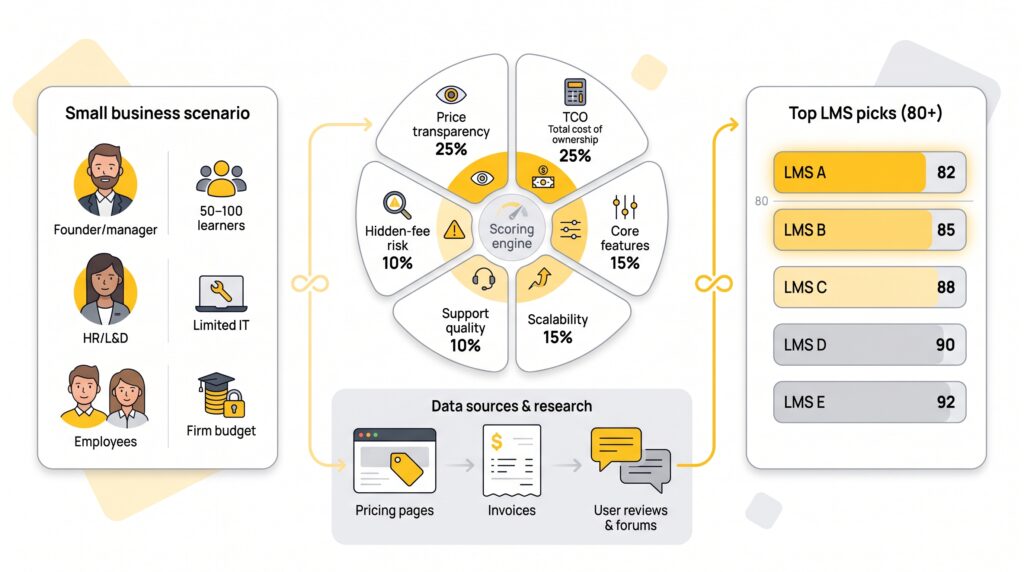
We didn’t trust glossy brochures or vague review sites. Instead, we built a clear yardstick and measured every vendor against it.
First, we defined a typical small-business scenario: a team of 50–100 learners, limited IT support, and a firm ceiling on monthly spend. That persona guided every question we asked and every contract we reviewed.
Next, we scored twelve cloud LMS platforms on six weighted criteria that capture real-world cost and practicality. Price transparency and total cost of ownership each counted for 25 percent of the grade, because if you can’t see the price or predict it, nothing else matters. Core features and scalability carried 15 percent each, and we rounded out the rubric with support quality and hidden-fee risk at 10 percent apiece.
We pulled numbers from public pricing pages, free-trial dashboards, and sample invoices, then cross-checked them against recent user reviews and forum threads to catch any surprise overage charges.
Finally, we tallied the scores. Five platforms rose to the top with overall marks above 80. The countdown you’ll read next is based on those numbers, not on sponsorships or intuition.
Cloud LMS pricing at a glance
Before we explore each platform, let’s anchor on the numbers that matter: starting price, fee structure, and any early red flags. Scan the table, spot the stand-out deals, and keep it nearby as you read the countdown.
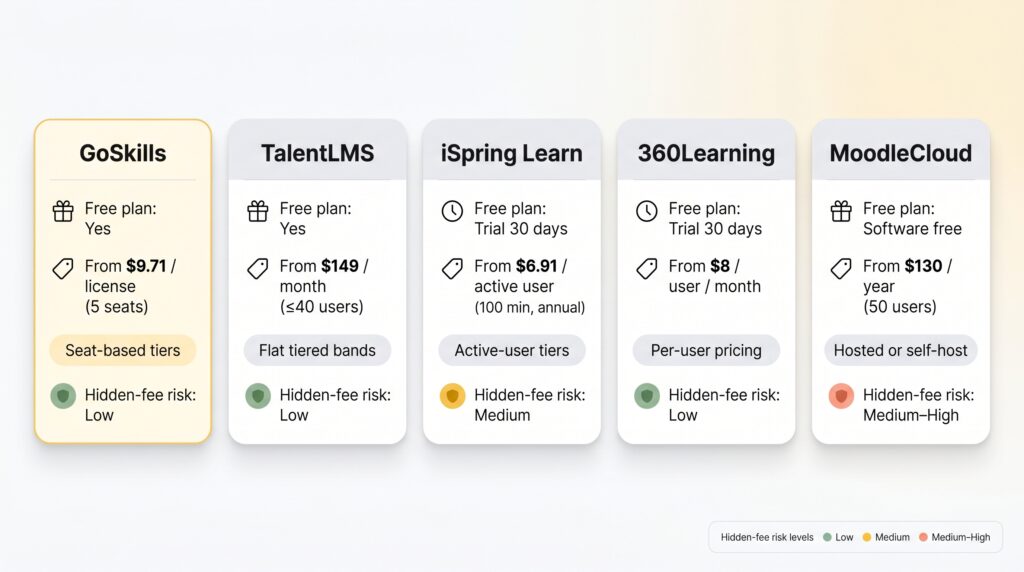
Use this snapshot to verify any quote you receive. If the numbers you hear drift far from the ranges above, ask for an explanation, then run the math again.
1. GoSkills LMS: best overall value for small teams
GoSkills tops our list for one simple reason: you can start training every employee today without pulling out a credit card. The free-forever plan lets you invite unlimited learners and build as many courses as you like, removing the biggest hurdle small businesses face: upfront cost.
When you’re ready for richer analytics or certificates, paid tiers drop in smoothly. Pricing starts at $9.71 per license per month for a five-person bundle and falls as your team grows. Because you buy seats in packs, you can match your exact headcount without paying for extras.
Hidden fees? None. Hosting, updates, and standard support are included, and because everything runs in GoSkills’ cloud you avoid the server costs and upkeep that on-site systems rack up—a saving the Top 10 Cloud-Based LMS Platforms in 2026 guide estimates can trim thousands from a first-year budget. You can upgrade, downgrade, or cancel from the dashboard—no sales call required.
Feature highlights include a drag-and-drop course builder, AI-assisted content creation, and a built-in microlearning library, so you can launch compelling material in hours, not weeks. Integrations with Zapier and popular HR apps keep data flowing without custom code.
Bottom line: if you want maximum learning impact for every dollar and minimal admin hassle, GoSkills is the clear front-runner.
2. TalentLMS: quick-start champion with crystal-clear pricing
If you value simplicity, TalentLMS feels like a deep breath. You land on the pricing page and see every tier, every user limit, every dollar, with no contact form or “call for quote.” The free plan covers 5 users and 10 courses, plenty for a pilot.
Move to the Core tier and 40 learners cost $149 a month on monthly billing, with a discount when you pay annually. Fees stay flat; add learners until you hit the cap and the rate never changes. That predictability lets you lock budgets months ahead.
The platform itself leans into ease. Course creation is drag-and-drop. Branches let you spin up separate portals for departments or external clients in minutes. Standard integrations such as Slack, Zoom, and Zapier switch on with a toggle, not a statement of work.
TalentLMS also excels at learner experience. Gamification badges, native mobile apps, and clean navigation keep learners motivated without extra plugins. Support is responsive, included in every plan, and rarely needed thanks to thorough documentation.
For small teams that want to pilot today and scale tomorrow, TalentLMS offers a frictionless path from first login to full rollout while staying within a modest budget.
3. iSpring Learn: pay-for-usage power with built-in authoring
Some teams train all year. Others run quick bursts during onboarding, then go quiet for months. If you fall into that second group, iSpring Learn’s active-user model can shave thousands off your bill.
You can register unlimited employees, but your tier depends on how many log in during a month. The smallest bundle covers 100 active users at about $6.91 each when billed annually. Add as many employees as you like; as long as no more than 100 log in during the month, you stay within your tier.
That flexibility comes with solid muscle. Every subscription includes one license of iSpring Suite, the company’s authoring toolkit that turns PowerPoint into interactive e-learning. Drag in video, layer quizzes, publish to SCORM, then push to the LMS in one click. Extra author licenses cost more, so plan ahead if several people build content.
Learner experience holds up too. Clean dashboards, mobile offline access, and deep reports keep managers informed without drowning them in data. Unlimited storage means big video files never trigger surprise overage fees.
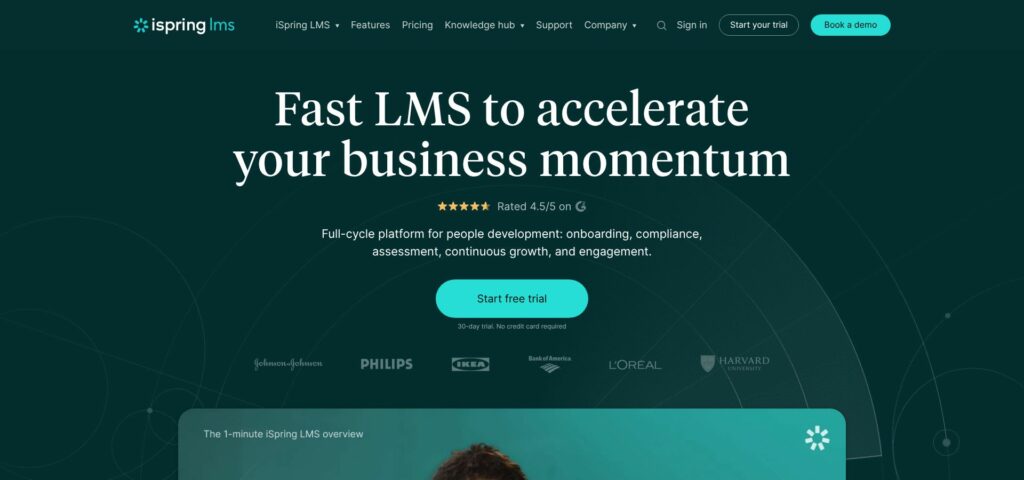
The trade-off? You must prepay for the year and commit to at least 100 active seats, so the entry ticket is higher than our first two picks. Still, for seasonal or project-based training where active headcount swings wildly, iSpring Learn can be the budget accelerator your finance team will appreciate.
4. 360Learning: collaborative learning without commitment
Some LMSs feel like digital filing cabinets. 360Learning feels more like Slack for skill building. Courses open to threaded discussions, learners can up-vote helpful comments, and subject-matter experts tweak content on the fly. That social layer turns passive modules into living knowledge hubs.

Cost stays simple. The Team plan charges $8 per user each month with no minimum headcount. If 15 employees need access, you pay $120 a month.
All core features are included: built-in authoring, AI suggestions to tighten lessons, and integrations with Zoom, Slack, and more. Storage is unlimited, and standard support is included, though response times are slower than enterprise tiers.
Watch the tipping point. At about 100 users, TalentLMS’s flat tier undercuts 360Learning on dollars per head. For a smaller team, 360Learning’s low per-user entry price is hard to beat.
Pair that flexibility with an interface employees enjoy, and 360Learning becomes the standout choice for teams that crave collaboration but dislike long contracts.
5. MoodleCloud: ultra-low price, higher do-it-yourself cost
If your budget is stretched thinner than a home-office Wi-Fi signal, Moodle looks tempting. The software is free, open source, and trusted by universities worldwide. Choose MoodleCloud hosting and you still spend little: 50 users cost about $130 a year, roughly two lattes a month.
Savings come with strings. Moodle is a toolbox, not a turnkey appliance. Someone on your team must handle site setup, plugin selection, and periodic upgrades. Basic cloud plans cap storage at a few hundred megabytes and include forum-only support, so troubleshooting often means combing community threads.
That said, flexibility is hard to beat. Need a quiz engine that enforces proctored exams? Install a plugin. Want a language pack for a bilingual workforce? Toggle it on. Because the code is yours, you can integrate, theme, or extend without waiting for a vendor roadmap.
Moodle shines for organizations with an IT tinkerer on staff who value ownership over convenience. If you prefer vendor-managed simplicity, the earlier picks serve you better. When every dollar must stretch and customization is king, Moodle delivers enterprise-level capability at pocket-change prices, provided you’re ready to roll up your sleeves.
Pricing trends to watch through 2026
LMS vendors once kept their price lists secret, but that wall is crumbling. The clearest proof is 360Learning’s Team plan, a public rate of $8 per user each month that was rare a few years ago. Expect more rivals to follow or risk losing budget-savvy buyers.
Up-front transparency is only half the story. Inflation and rising cloud costs are nudging sticker prices higher. TalentLMS raised its Core tier to $149 a month. Vendors defend the jump by bundling AI tools, yet many charge extra to enable those features for every learner.
Hidden fees are under sharper scrutiny too. Sixty-six percent of enterprise software projects run over budget, and 58 percent of businesses regret a recent software purchase. That regret is driving shorter contracts, pilot-first buying, and tougher questions about storage caps or support tiers.
Bundles are back in style. Platforms like GoSkills sweeten the deal with built-in microlearning libraries, saving you a separate content subscription. When the content matches your skill gaps, it can cut total cost of ownership; when it doesn’t, you’re paying for shelfware.
Community momentum is also steering open-source options into more boardrooms. Moodle’s rock-bottom hosting tiers tempt penny-pinched teams, but the real cost is do-it-yourself effort. Savvy buyers weigh that sweat equity against license fees and decide whether time or cash is the scarcer resource.
Keep these shifts on your radar, negotiate hard, and lock multi-year price protection only after a thorough pilot proves the platform is worth it.
Honorable mentions worth a demo
Litmos impresses with a large built-in content library and a slick learner app. The catch? Pricing is quote-only, so every prospect must schedule a sales call. Reports from small buyers peg entry costs higher than our finalists once you add the library.
Absorb LMS is a powerhouse for compliance-heavy organizations, offering advanced analytics and an AI course creator. However, its pricing is custom-quoted and typically ranges from $8–$12 per active user, which can strain the budget of a very small startup.
Coassemble offers accessible tiered pricing, with entry plans starting as low as $10–$50 a month, depending on your creator and user needs. It provides excellent value for lean teams that want to produce microlearning without steep per-user costs as they grow.
Course-selling platforms like LearnWorlds, Teachable, and Thinkific tempt entrepreneurs with plans under $40. They excel at ecommerce but tack transaction fees onto every sale and lack comprehensive employee reporting, so they fall outside the scope of internal upskilling.
Treat these options as wildcards. If one aligns perfectly with your needs, book a trial. Just inspect the contract with the same rigor we used here, especially around hidden add-ons and renewal terms.
Your top LMS pricing questions, answered
Is a free plan enough for the long haul?
A free tier is perfect for testing workflows and winning internal buy-in, but it rarely scales. Most cap users, courses, or reporting, so budget now for the day you outgrow those limits. Treat “free forever” as “free for proof of concept.”
What hidden fees trip up first-time buyers?
Implementation help, storage overages, premium support, and single sign-on are the usual suspects. Ask vendors to quote the total bill for your exact user count, file volume, and feature set, not a best-case teaser.
Active users vs. registered users: why does it matter?
Paying for active seats saves money when training is seasonal or project-based. If everyone learns each month, a flat tiered plan like TalentLMS is cheaper. Map your learner cadence before choosing a model.
Should we lock in an annual contract?
Annual billing cuts 15–20 percent off most SaaS lists and freezes the price for 12 months. Pilot on monthly terms first, then switch to annual once the platform proves its worth.
One quick budgeting tip?
Assign an internal “LMS owner” and budget their hours. The biggest hidden cost is often staff time spent building courses and chasing completions, not the subscription itself.
Conclusion
Cost-effective learning platforms are no longer a myth. Start with transparent pricing, verify hidden-fee policies, and pilot on terms that let you walk away. Whether you prioritize plug-and-play simplicity, collaborative learning, or open-source flexibility, the five options above give small businesses the leverage to launch impactful training without budget blowouts.