
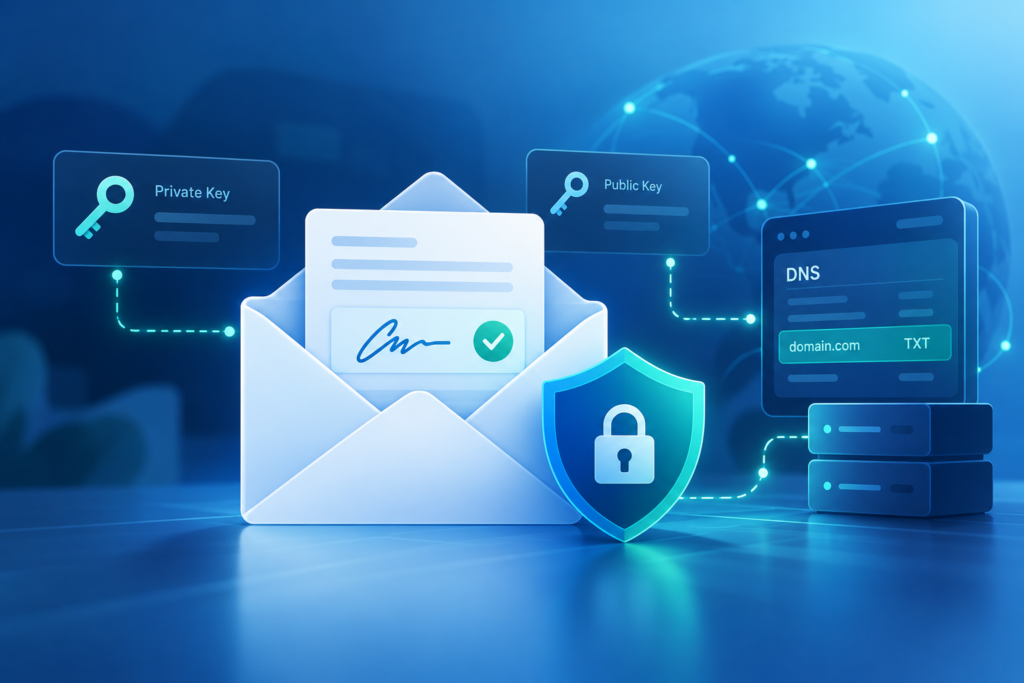
DomainKeys Identified Mail (DKIM) is an essential email authentication technique aimed at preventing email spoofing, phishing, and unauthorized modifications during transmission. Essentially, DKIM allows the email sender to append a digital signature to every outgoing message through a cryptographic method. This signature is associated with the sender’s domain name, enabling receiving mail servers to verify both the origin and integrity of the message.
Today, email is crucial for organizations as a key means of communication and marketing. However, the rise of spam and advanced phishing attacks has made it vital to ensure recipient trust and secure email delivery. Alongside SPF and DMARC, DKIM is a cornerstone of a robust email security strategy. Tools like MxToolbox, EasyDMARC, and Mailo highlight the importance of effective DKIM implementation for organizations that want to safeguard their reputation and maintain user trust.
When an email is dispatched, DKIM creates a unique hash (the digital signature) using the sender’s domain’s private key. The recipient’s mail server then retrieves a public key listed in the DNS as a DKIM record to authenticate this hash. If the keys align and the signature remains unchanged, the email is verified. This procedure is crucial for ensuring the integrity of emails, thwarting spoofing attempts, and confirming that messages arriving in recipients’ inboxes remain unaltered by malicious actors.
How a DKIM Lookup Works: Public Keys, DNS Records, and Signatures
The functioning of DKIM is centered on the interaction of cryptographic keys, DNS entries, and email headers. The dkim selector, commonly known as the selector tag in the DKIM-Signature header of an email, specifies the appropriate DKIM key for validation within the sender’s domain’s DNS zone.
The DKIM Lookup Process
The DKIM verification process starts when an incoming email arrives at a receiving mail server. The server examines the email header, locates the DKIM-Signature field, and extracts important information:
- Signing Domain: The domain that asserts responsibility for the email’s signature.
- Selector Tag: Specifies which DKIM public key to use for the validation process.
- Signature: The cryptographic hash created by the sender of the email.
Next, the mail server constructs a DNS query to find the DKIM selector using the format:
`._domainkey.`
This query fetches the associated DKIM record, usually stored as a TXT record that includes the public key. The receiving server then employs this public key to check the DKIM signature. If the digital signature aligns with what’s recorded in the DKIM entry, the message successfully passes DKIM authentication.
Role of the DKIM Public Key
The DKIM public key serves as a crucial element in the whole system. It can be found publicly in the DNS, whereas only the permitted email sender possesses the corresponding private key. This setup of public and private keys enables any receiving mail server or external service to verify message authenticity and guard against spoofing attempts.
DKIM Record Syntax
A correct DKIM record format consists of various tags like `v=DKIM1; k=rsa; p=[public_key]`, with `p` housing the actual public key. To enhance security, some organizations routinely rotate their keys, updating the public key in their DNS and modifying the associated private key on their mail servers.
How to Perform a DKIM Lookup Step by Step
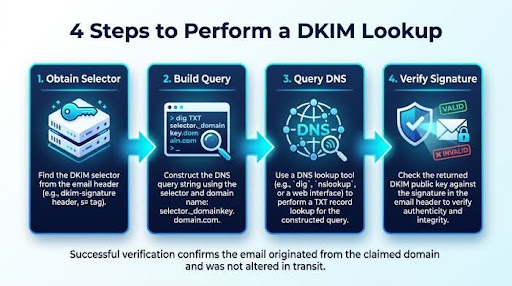
For organizations aiming to confirm their DKIM settings or address DKIM validation problems, carrying out a DKIM lookup and check is crucial. Both technical experts and non-technical users can utilize automated tools or follow manual verification steps outlined below.
Step 1: Obtain the DKIM Selector
Start by obtaining the DKIM selector from an example email originating from the organization’s domain. You can usually locate it within the email header, specifically in the DKIM-Signature line (`s=selector`). For automated evaluation, consider using tools like EasyDMARC’s Email Header Analyzer or the Header Analyzer from MxToolbox, which can identify the selector value for you.
Step 2: Build the DNS Query
To create the DNS lookup string, combine the selector with the domain name in the following format: `._domainkey.`
For instance, if the selector is `mailo` and the domain from which an email is sent is `company.com`, the resulting query will be:
`mailo._domainkey.company.com`.
Step 3: Query the DNS Record
You can utilize command-line utilities like `nslookup` or websites such as MxToolbox DKIM Lookup, EasyDMARC DKIM Record Checker, or the DKIM Validator available on G2 Crowd and SourceForge.
Example Command:
Execute the command `nslookup -type=TXT mailo._domainkey.company.com` to retrieve the DKIM record that includes the public key.
Step 4: Verify the DKIM Record and Signature
Insert the output record into a DKIM Record Checker or utilize an Email Deliverability Test tool by uploading an example email. The DKIM validator will check the signature, attempting to align the signature created by the sender’s private key with the DKIM public key published in the DNS.
If the information corresponds correctly, the message successfully passes DKIM authentication; if not, additional scrutiny is required.
Helpful Third-Party Services
Some of the best tools available comprise:
- MxToolbox for DKIM Lookup and DKIM Record Generation
- EasyDMARC for checking DKIM records and analyzing DMARC XML reports
- Mailo for managing mail servers along with EasySPF
Additionally, numerous services assess compliance with related protocols like DMARC and SPF, as well as advanced standards including BIMI, MTA-STS, and TLS-RPT, according to Expert Insights.
Common DKIM Lookup Errors and How to Fix Them
Problems with DKIM setup can compromise email security and diminish trust. It’s crucial for IT administrators and domain owners to recognize common DKIM lookup mistakes and their remedies.
1. No DKIM Record Found
Issue: The DKIM selector is either absent or improperly set up in DNS, leading to a failed DKIM check which generates this error.
Resolution: Refer to the documentation for your mail server or marketing platform to find the correct selector. Once located, ensure to add or update the relevant TXT record in your DNS provider’s management interface.
2. DKIM Verification Failed
- Issue: The discrepancy arises when the DKIM signature does not align with the public key obtained from DNS. This often occurs because of key rotation problems, improperly configured email servers, or syntax errors in the DKIM record.
- Resolution: Create and republish the public key with a DKIM Record Generator, ensuring that the private key is correctly aligned with the sender’s email platform settings. Always verify that the formatting of the DKIM record is correct (no line breaks and appropriate characters).
3. Multiple DKIM Records or Wrong Selector
- Issue: The presence of several selectors or records can create confusion, resulting in verification errors or unchecked items.
- Resolution: Employ a DKIM validator to determine the currently referenced selector tag. Ensure that DKIM settings are uniform across all outgoing email sources, such as helpdesk software and any external services.
4. DKIM Public Key Length Issues
- Issue: Keys that are short or no longer current are susceptible to attacks and can be identified by tools like DMARC XML Report Analyzer.
- Recommendation: Transition to a minimum 2048-bit DNS published key and implement regular key rotations, adhering to the best practices provided by EasyDMARC Academy.
DKIM Best Practices for Stronger Email Security and Deliverability
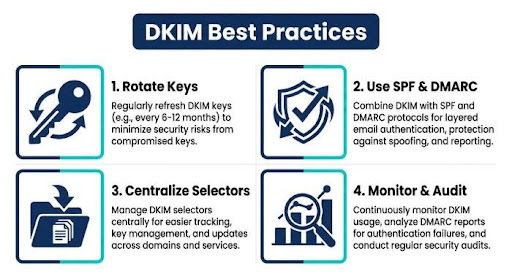
Enhancing the effectiveness of DKIM lookups involves more than just implementation; it requires continuous upkeep, oversight, and integration with wider authentication approaches.
Regularly Review and Rotate Keys
- Regularly rotating keys every 6 to 12 months reduces the chances of key compromise. Be sure to refresh the DNS DKIM record and align any updates to private keys with your main email service and any external providers you use.
Combine DKIM with SPF and DMARC
- Adopt a tiered strategy utilizing SPF and DMARC. DMARC can establish policies — whether to reject, quarantine, or allow emails — based on the verification results from DKIM and SPF, thereby strengthening defenses against phishing and mitigating the risk of email spoofing.
Centralize Selector Management
- Record all current DKIM selectors along with their specific functions (such as for transactional emails, marketing platforms, or customer support applications). To prevent selector clutter, ensure that any unused selectors are disabled quickly.
Monitor Reports and Deliverability
- Utilize DMARC failure reports, APRF insights, and email deliverability testing tools to actively resolve problems that affect message delivery and the reputation of your domain.
Train and Audit
- Utilize training tools such as EasyDMARC Academy to inform your teams, and make it a habit to conduct frequent audits of DNS settings, DKIM records, and configurations for outgoing emails.
Stay Current
Seek advice from top authorities like Expert Insights and prominent regional experts (like those in EMEA and Mid-Market) to stay informed about trends in email security and changes to authentication protocols.
By adhering to these recommended practices and utilizing a dependable DKIM lookup tool, companies can enhance the integrity of their emails, boost deliverability, and safeguard their domain’s reputation during the transmission process.